29th June 2026
Sleeve 3.3 adds new options inspired by the timeless appearance of vintage records, with new ways to customize the appearance of Sleeve's artwork on your desktop.
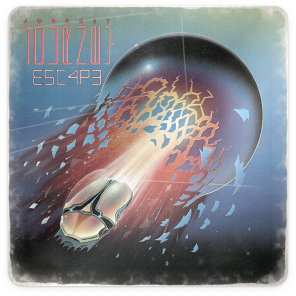
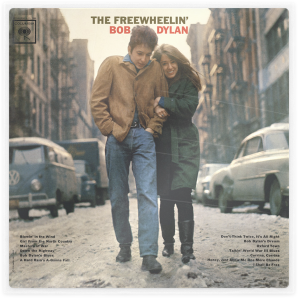
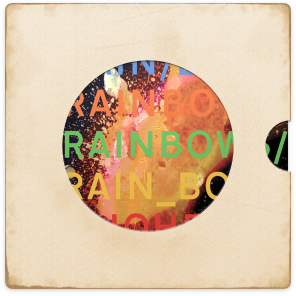
Every so often we get the urge to inject a little more fun into Sleeve. Back in Sleeve 2.3 we added shelves, made in different finishes, and in this update we're leaning further into the realms of collection-based nostalgia.
The new Artwork condition settings let you age album covers by adding dusty fading and wear, rough up the edges and corners, and even add blemishes and scratches to really make your artwork look like it's lived a life.
The effects are dynamically generated, with per-album variation, so the wear feels natural and realistic. Push the sliders gently for a sleeve that looks like it has been handled a few times, or really dial things up for that scuffed record store bargain-bin aesthetic.
With the new Album protection settings, you can take the nostalgia even further. Add a glossy outer plastic sleeve, slip the album into a cut-out inner one, or use both together. The sleeves even take the brunt of the wear and tear, a little detail, but one that brings the whole thing to life.
These options sit alongside the existing shelf styles, so if your theme already has a little physical presence, 3.3 gives it even more. Sleeve lives up to it's namesake and inspiration at last.
There's also a new Sheen lighting effect for album artwork, joining the existing Spotlight and Glare options. It gives covers a soft diagonal reflection, especially nice when paired with the new plastic sleeve styles.
We've also added a new Highlight setting that shows up in several places, enhancing and refining artwork edges, playback controls, progress bars and backdrops.
It's not just superficial in this release, Sleeve 3.3 also includes a host of reliability work and fixes. The album view should use fewer system resources, hover interactions are more stable, and Apple Music and Mission Control compatability is improved.
As usual, you can manually check for updates in the System tab of Sleeve to install the update, or if you purchased via the Mac App Store, you can do so from the Updates tab in the store.
No subscriptions. No in-app purchases. Requires macOS 26 Tahoe or later.
We hope you have fun making Sleeve look a little more loved, a little more worn, and maybe a little more like the favourite record you keep pulling from the shelf.
Al & Hector